12 Min. Lesezeit
Why Your Page Is Not Indexed in Google - And How to Fix It
Learn why a page is not indexed in Google, how to diagnose the exact cause in Search Console, and how to fix common indexing issues like noindex, robots.txt, canonicals, redirects, and sitemap problems.
Inhaltsverzeichnis
Spring direkt zu dem Abschnitt, den du lesen möchtest, ohne durch den ganzen Artikel zu scrollen.
What "not indexed" actually means
A page that is not indexed cannot appear as a normal Google Search result. That sounds alarming, but not every non-indexed URL is a problem. Redirected URLs, duplicate versions, alternate paths, and intentionally blocked pages are often supposed to stay out of the index.
The real issue is when an important canonical page is missing from Google and you do not know why. That is where a structured diagnosis matters more than guessing.
Start in Google Search Console before you change anything
The fastest way to waste time is to start editing tags, rewriting copy, or resubmitting URLs without checking the actual indexing reason first. Open the Page Indexing report in Google Search Console, find the affected URL or status bucket, and then inspect the specific page in URL Inspection.
Search Console gives you the exact language Google is using: noindex, blocked by robots.txt, crawled currently not indexed, duplicate without user-selected canonical, page with redirect, and so on. Once you know the label, the next step becomes much clearer.
- Open the Page Indexing report and identify the exact status label
- Use URL Inspection on the affected page
- Compare the indexed result with the live test
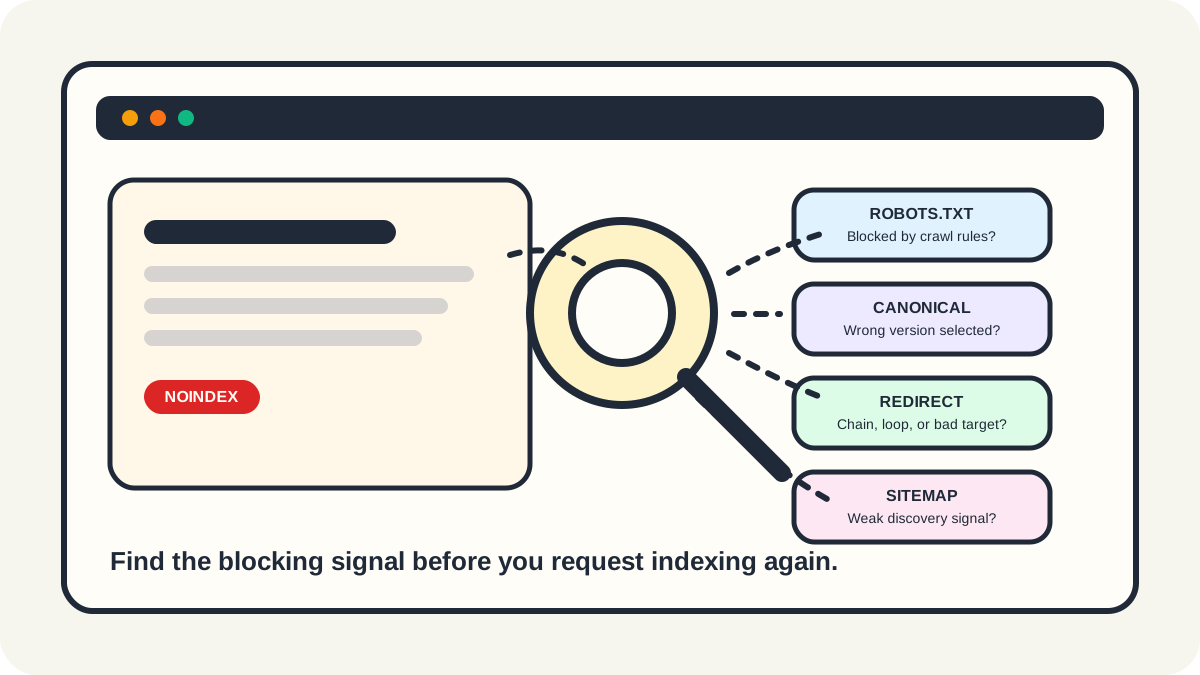
- Fix the blocking issue before requesting indexing again
Check for noindex and robots.txt conflicts first
Two of the most common blockers are also the easiest to miss. A page may carry a meta robots noindex directive in the HTML head, or an X-Robots-Tag header in the response. In other cases, the page is blocked by robots.txt, which can stop Google from crawling the page and seeing any page-level indexing directives at all.
These are different problems and they should not be mixed together. If you want a page out of Google, noindex is the right instruction. If you want a page indexed, a robots.txt block can get in the way of diagnosis and crawling.
Review canonical signals and duplicate URLs
Some pages fail to index because Google sees them as duplicates or chooses a different canonical than the one you intended. This often happens when similar URLs, filter parameters, mixed internal links, inconsistent canonicals, or alternate page versions all point in different directions.
Not every duplicate state is bad. If Google indexes the best representative page and leaves the duplicate out, that is often working as intended. The problem is when the important version is not the one being selected, or when you never made your preferred canonical clear in the first place.
- Check the user-declared canonical against the Google-selected canonical
- Use one consistent preferred URL in internal links
- Avoid treating noindex as a canonicalization strategy
- Make sure similar pages are either clearly distinct or intentionally consolidated
Look for redirect and discovery problems
A page may also stay out of the index because Google hits redirect loops, chains that are too long, weak discovery paths, or incomplete sitemap coverage. Redirected URLs are usually not meant to be indexed themselves, but broken redirect behavior can stop Google from understanding where the final page should be.
Sitemaps help discovery, especially for newer or deeper pages, but they do not guarantee indexing. A sitemap is a helpful signal, not a force command. Important pages still need clean crawl paths, solid internal links, and a stable final URL.
When the page is crawlable but still not indexed
Statuses such as crawled currently not indexed or discovered currently not indexed often push site owners toward panic, but they usually point to a different class of problem. Google reached the page or found the page, then decided it was not worth indexing yet or not worth prioritizing right now.
That can happen when the page is too thin, too repetitive, too soft-404-like, too weakly linked, or too low-value compared with the rest of the site. At that point the fix is less about technical tags and more about whether the page genuinely deserves to exist as a strong standalone result.
Server, access, and quality issues still matter most
If the page returns 5xx errors, authentication barriers, unstable responses, or weak content signals, Google may never reach the indexing stage cleanly. No amount of resubmission fixes a page that is unavailable, unreliable, or too weak to justify indexing.
Once the root issue is fixed, run the live test again in Search Console, confirm that the page is indexable, and only then request indexing. Think of the request as the final step after repair, not as the repair itself.
Häufig gestellte Fragen
Hilfreiche AntwortenWhy is my page not indexed even though it is in my sitemap?
Because a sitemap helps discovery, but it does not guarantee indexing. Google can still skip a page if it finds noindex directives, duplicate signals, redirect problems, weak content, or soft 404 behavior.
Should I request indexing every time a page is missing?
No. First confirm that the real blocker is gone. Repeated indexing requests do not solve a page that still has noindex, robots.txt conflicts, canonical problems, redirect errors, or low-value content.
Can a page be blocked by robots.txt and still appear in Google?
Yes. Google can sometimes index a blocked URL from links or other signals without crawling the page itself. That is why robots.txt is not the right tool if your real goal is to deindex a page.
What does crawled currently not indexed usually mean?
It usually means Google could access the page but did not think it should be indexed yet. Common reasons include duplication, weak value, thin content, or low crawl priority.